Exposure · 3 min read
Exposure Value: the method, worked through
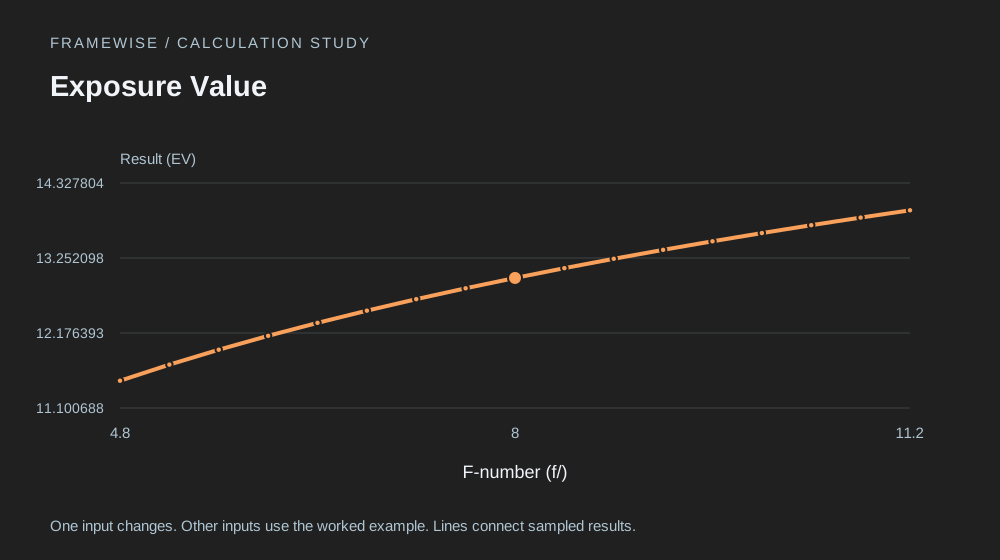
Exposure value combines aperture and shutter time on a logarithmic scale.
Exposure, optics and production arithmetic for photographers and video makers.
Exposure · 2 inputs
Exposure value combines aperture and shutter time on a logarithmic scale.
Open calculator ↗Normalizing exposure settings to ISO one hundred makes equivalent settings easier to compare.
Open calculator ↗Each additional stop doubles exposure time at a fixed aperture and scene.
Open calculator ↗F-number controls aperture area through a squared relationship, which gives two logarithmic factors.
Open calculator ↗ISO ratios can be expressed as exposure-setting stop differences.
Open calculator ↗A neutral-density filter extends the required exposure time by a power-of-two factor.
Open calculator ↗A filter factor describes how much longer exposure must be; its logarithm gives stops.
Open calculator ↗Optical density is based on powers of ten, while exposure stops are based on powers of two.
Open calculator ↗Transmission is the fraction of incident light remaining after an ideal filter.
Open calculator ↗For equivalent rendered brightness at a fixed aperture, shutter time scales inversely with ISO.
Open calculator ↗Changing aperture requires a squared shutter-time correction to preserve optical exposure.
Open calculator ↗A stop-based correction becomes a multiplicative exposure factor.
Open calculator ↗Crop factor expresses a field-of-view comparison relative to a chosen full-frame reference.
Open calculator ↗A rectilinear lens's horizontal angle of view follows sensor width and focal length.
Open calculator ↗Vertical angle of view uses the sensor's shorter dimension for a landscape-oriented frame.
Open calculator ↗The sensor diagonal supports format comparisons and diagonal field-of-view calculations.
Open calculator ↗A diagonal crop factor compares the sensor diagonal with a 36 by 24 millimetre reference.
Open calculator ↗A distant-subject approximation estimates the horizontal scene width captured at a given distance.
Open calculator ↗Rearranging the angle-of-view geometry gives a starting camera distance for a desired framing width.
Open calculator ↗Hyperfocal distance comes from a geometric sharpness criterion set by the circle of confusion.
Open calculator ↗The near depth-of-field boundary estimates where defocus reaches a chosen blur-circle tolerance.
Open calculator ↗The far depth-of-field boundary follows the same geometric blur criterion as the near boundary.
Open calculator ↗Megapixels count the total samples in a rectangular image grid.
Open calculator ↗Pixel dimensions and chosen print density together determine output size.
Open calculator ↗An image's vertical pixel count sets print height at a specified pixels-per-inch density.
Open calculator ↗A target physical dimension converts into a minimum whole-pixel requirement.
Open calculator ↗Aspect ratio determines width from a known height.
Open calculator ↗A target frame proportion determines height from width.
Open calculator ↗A resize percentage describes linear scaling, which can be applied equally to both dimensions.
Open calculator ↗A centred crop with the same aspect ratio reduces both dimensions by the crop factor.
Open calculator ↗An average encoded bitrate turns a running time into an estimated file size.
Open calculator ↗Available decimal gigabytes can be converted into an ideal recording duration.
Open calculator ↗A frame budget relates a capture duration to the interval between exposures.
Open calculator ↗A sequence's frame count determines playback length at the chosen frame rate.
Open calculator ↗Working backward from a desired clip duration establishes an average capture interval.
Open calculator ↗Shutter angle expresses exposure time as a fraction of a frame period.
Open calculator ↗Converting shutter time to angle helps compare motion blur at different frame rates.
Open calculator ↗Playing each captured frame once at a lower frame rate stretches the clip duration.
Open calculator ↗The ratio between capture and playback rates gives the duration multiplier.
Open calculator ↗A fixed-rate clip maps running time to a whole frame count.
Open calculator ↗A three-channel pixel buffer has a size determined by dimensions and channel depth.
Open calculator ↗Average file size estimates how many images fit within a storage budget.
Open calculator ↗A measured effective transfer rate predicts how long a backup may take.
Open calculator ↗Uncompressed PCM audio storage follows sample count, channel count and bits per sample.
Open calculator ↗Reproduction ratio compares the physical image on the sensor with the physical subject.
Open calculator ↗A simple lens model estimates additional magnification from added extension.
Open calculator ↗At close focus, an ideal symmetric lens needs increased exposure as extension grows.
Open calculator ↗A point-like source spreads light over an area that grows with distance squared.
Open calculator ↗A guide number relates direct flash distance to aperture at specified flash and ISO settings.
Open calculator ↗A simplified angular panorama model combines a first frame with additional nonoverlapping portions.
Open calculator ↗No matching tools. Try a shorter search or choose all categories.
Exposure value combines aperture and shutter time on a logarithmic scale.
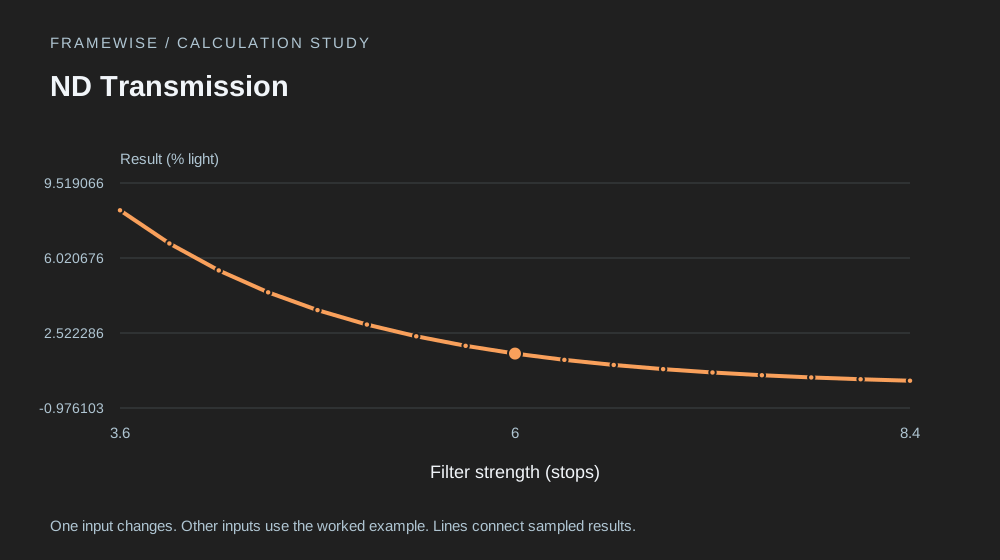
Transmission is the fraction of incident light remaining after an ideal filter.
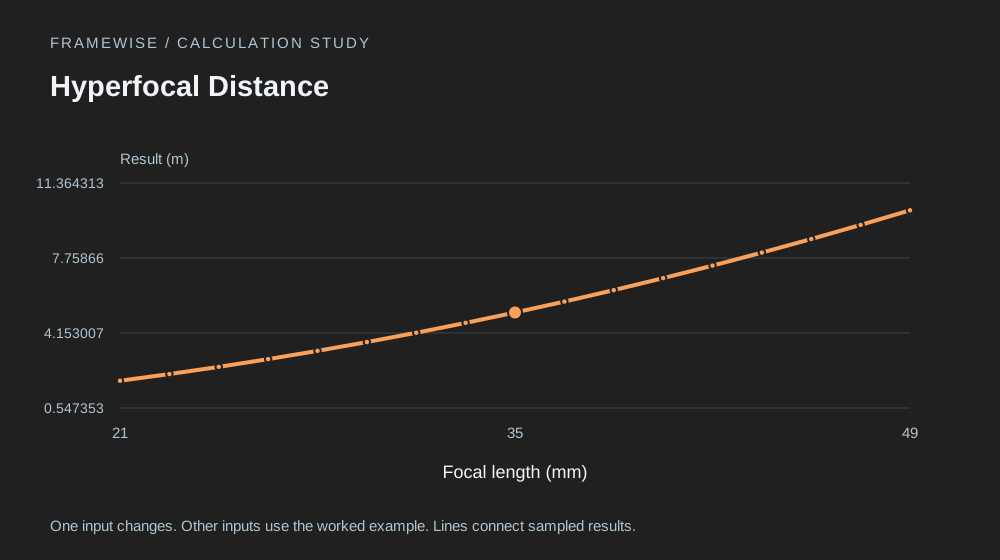
Hyperfocal distance comes from a geometric sharpness criterion set by the circle of confusion.